Home
» Download Trial Version   » Pay now
Super Diary


YouTube Watch the Video
Are you taking notes a lot and are you fed up with having to search for all your information in many single documents? Would you like to try something that helps you in your everyday document management? You have come to the right place! Super Diary is a powerful multi-purpose diary program /journal program for your daily document management, private or business. It will soon become indespensable for you - it sure has for me! The program's main purpose is organizing and collecting text documents (and audio clips / voice diary entries), but there is a lot more to discover. Download your free trial version of Super Diary today!

Super Diary comes with 8 independent main modules, which are all working on one single, strongly encrypted Microsoft SQL Server CE database file. You can have as many documents and databases as you like.

I wrote this program basically for myself. Especially the "Notes" function is essential for me in my daily business and private work - finally I have an editor to replace my collection of single text documents. Using tabs, I can have as many documents open at the same time as I like. A single hotkey (for me it's Ctrl + Numpad5) shows and hides the program window, so It's always available but not in the way. And the "Logins" function makes logging in to all my password protected web sites (currently there are over 30 of them) a snap. Just select the site from the list and click "Login" is all it takes. It works great - even on my online banking sites. - Johannes Wallroth (the Developer)

Write a Journal / Log / Diary

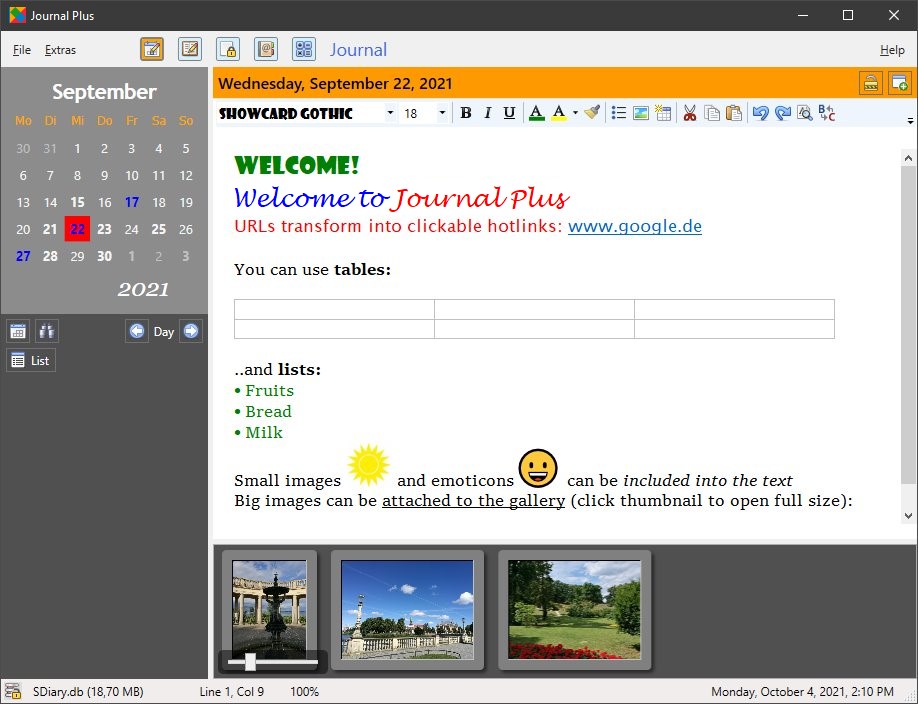
Super Diary - Notes Section Write your daily notes with the diary program / journal program, using a sophisticated word processor, style sheets, images, tables and hyperlinks. Each day can have an unlimited number of entries, organized in folders and subfolders inside a tree view on the left hand side of the editor. Open as many documents as you like at the same time (organized with tabs on the bottom of the document view). You can even open the same document several times and work on different sections at the same time!

Import existing text documents in *.doc, *.docx, *.rtf, *.html and *.txt format. Export your entries in *.doc, *.docx, *.rtf, *.html and *.txt and also *.pdf format, without using an external program. You can print or export several entries into one new document, with optional title / date information and page numbers.

  • Insert multiple entries for each day and attach a title to each one
  • Organize your entries in a calendar tree and/or in a folders and subfolders
  • Use a powerful editor with text formatting, colors, alignment, indent, tabulators...
  • Undo and redo, bullet/numbered lists, indenting
  • Configurable style sheets and style brush (to copy style to another paragraph)
  • Insert resizable images - anchored to a paragraph or floating
  • Insert hyperlinks and tables
  • Create and use an unlimited number of templates for your entries

Praise for Super Diary
  • »Finally... an easy way to get organized. If you're looking for a simple way to get organized and be more productive (without having to spend a lot of time learning how), this is definitely a program you should try. It has dramatically increased my productivity and accountability.«
  • »So much more than a great diary program - the word processor will tack my dictation program with ease. It is fast to use. You can keep adding notes through the day & go back to any day. This can be as simple or as complex as you like or need. I use the diary entry for random thoughts and detail events.«
  • »Simple yet powerful, very easy-to-use and intuitive interface, it looks good, it's quick and can be loaded onto a usb stick easily this is very helpful for me because I am on 4 different computers daily, my journal, contacts, finances, notes and statistics are with me 24/7. I dedicated a full day examining organizers and nailed it down to two and by chance I picked the Super Diary because I had no time for trial programs. Well, I was in luck!«
  • »It's small, inexpensive, and powerful. Meets many common needs for pc users. It works as advertised. Good price and support.«
  • »This is the best diary i have found in a diary program. It is easy to use; you do not have to be a techo and it does most of the work for you. Helps to keep track of everything you need. If i want to find something personal like phone numbers it is easy to find in this all in one program.«
  • »Extensive range of features and very easy to use.«
  • »Easy to use diary with unlimited number of entries.«
  • »Excellent diary program which fulfills 99% of my needs. It covers the full range of diary needs very well.«
  • »I sampled several other diary program before settling on Super Diary. This program simply cuts to the chase and I was up in running in minutes, making notes, keeping meeting records, etc. The interface, with its Outlook-like folder structure, makes it easy to organize large numbers of files by categories. I work in a project environment with many ongoing initiatives and Super Diary is well-suited to helping me document and manage these projects. «
Visit CNET / Download.com to read them

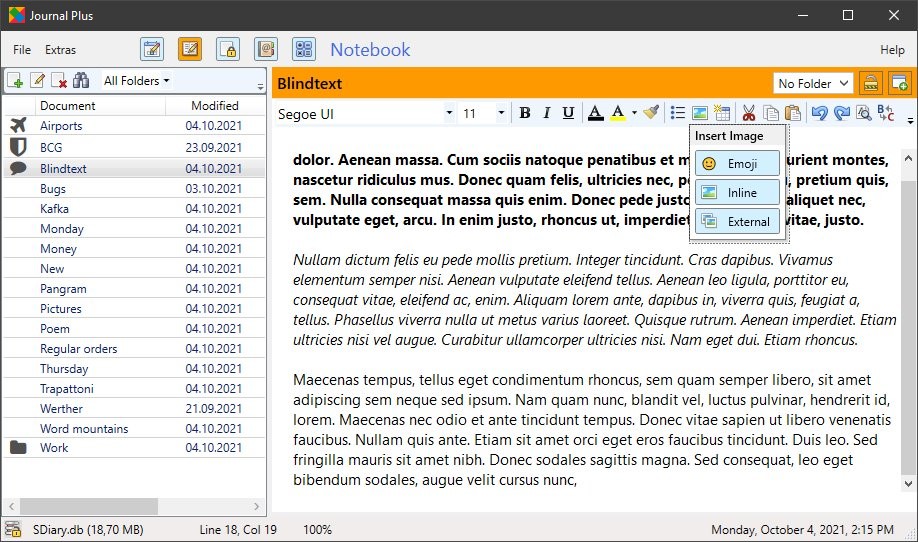
Collect and organize your Notes

The notes section is able to organize documents that are not connected to a specific date. The entries can be organized inside folders and subfolders, like in the journal section. You can create new folders and subfolders, rename and delete them and move your entries around in the tree structure. Taking and finding information has never been more intuitive and practical - now you can have all your scattered documents all in one program! Just press the shortcut (user-definable) and the program shows up and hides in the system tray, when you don't need it anymore.

Super Diary - Address Book

Organize your Contacts with the integrated Address Book

If Outlook or similar PIM programs are too overloaded or complicated for your taste, you now use the handy little address book that is built into Super Diary. You can collect name, address, notes and birthday and you can attach a picture for each entry. Data can be imported from CSV (Excel) or vCard / VCF. You can also print and export the data into an Excel-readable format. Remind yourself of birthdays, a week before and at the same day (both optional).


Calendar

Super Diary - Calendar The built-in weekly calendar can help you to organize your appointments. Click and drag the mouse anywhere in the calendar to create a new appointment. Use drag and drop to move appointments around. You can have recurrent appointments for every week, every month, every 3 months etc. Appointments can have color tags and reminder alarms attached. Export and print a list for any period of time.


Login Manager / Password Manager

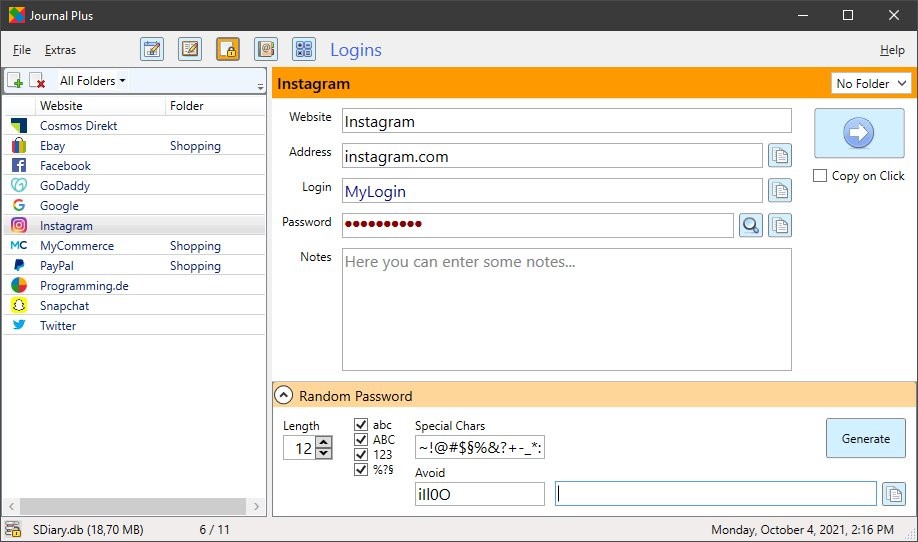
Super Diary - Login Manager Collect web addresses, logins and passwords for your password-protected websites. Never forget another password or log-in again. All you need is one password from now on (the one to log into Super Diary), and you can safely trust all your valuable and secret data to the program and never fear to forget or loose a password again. An advanced included password generator will help you to generate safe and unbreakable passwords of any kind, that nobody is able to guess.
  • Save title, url (address), login and password for any number of password protected sites
  • Import and export data (using the Excel-readable *.csv format) and print it
  • Favicons (the little icons from the browser address field) will be fetched and imported
  • The intelligent form analyzer will find and identify any forms and controls
  • Auto-Login: almost every page can be remote controlled (sorry, Internet Explorer only)
  • Integrated password generator; highly configurable for random passwords of every type and length

Super Diary - Finance Manager

Finance Manager / Expense Manager

Organize your budget easily and intuitively and track your personal or your business expenses. The included finance manager is a powerful program, that will help you to get control over your revenues and your expenditures. You can not only enter single payments or incomes, but also recurrent ones (they are inserted automatically, when they are due).
  • Insert title (purpose), amount and category of payments and revenues
  • Entries can be sorted and filtered by time span, type, title and category
  • Data can be imported, exported and printed
  • Recurrent payments can be made every day, every week, every 10 / 14 days, every month or every 2 / 3 / 6 / 12 months
  • Due payments are inserted automatically on program start

Super Diary - Sound Recorder

Sound Recorder / Sound Clip Organizer / Voice Diary

Record and collect sound clips, which can have a title and will be connected to a date, just like in the journal with the included sound recorder. This module uses the highly compressed and license-free OGG Vorbis format internally.
  • Record or import as many sound clips as you like for each date
  • Clips are not limited in length
  • Import sound clips from *.mp3, *.wma, *.ogg or *.wav
  • Auto-blank silent passages when you record clips (optionally)
  • Scrub (quickly jump) in recordings with the slider
  • Use any quality setting for the recording - for best quality or smallest disk space
  • Export clips later, if you need to (original recording quality, in *.ogg format)
  • Sound clips are saved in the common database, along with all the other data

Super Diary - Statistics (Graph Mode)

Statistics

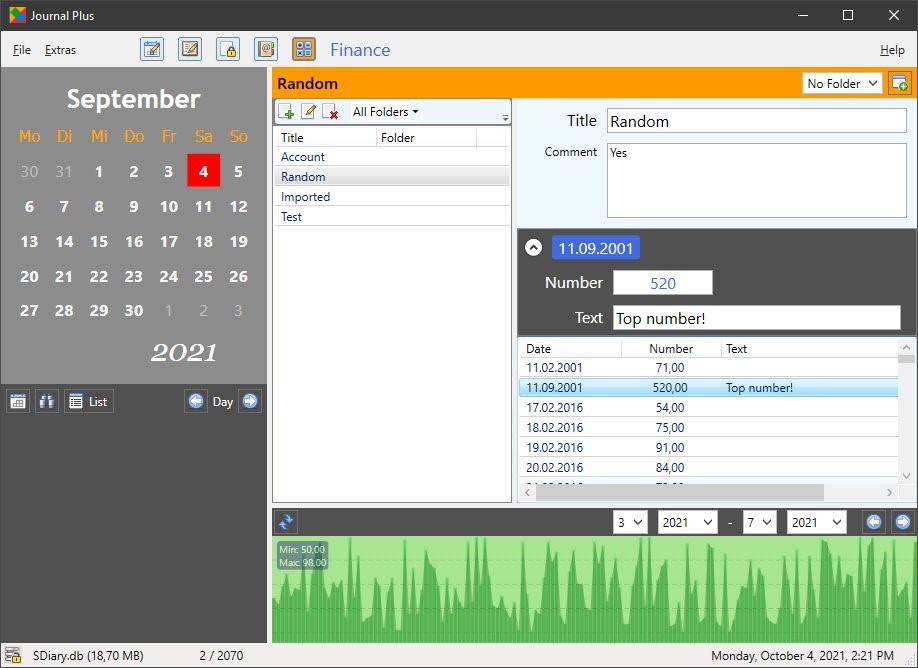
You can use the built-in statistics module to enter and organize up to 6 numeric values for each day. The numeric values can be of any range, even high-precision floating point and negative numbers are possible. Table view and graphical chart view.
  • Observe 6 numerical values for each date - in any range, even floating point or negative values are allowed
  • Assign a title text and a color to each value
  • Data can be imported, exported and printed
  • Choose the table view or the graphical chart view
  • Move the mouse over the chart and see the real values in a tooltip.
  • Filter the data according to a given time span
  • Edit or delete multiple values with the context menu in the table view

Alarm Clock

Super Diary - Alarm Popup You have a resizable Alarm Clock available as an additional tool built right into the program interface and always visible on the left hand side.
  • Resize the clock or make it invisible, simply by dragging the border (hover the mouse to make the border visible)
  • Choose from one of five available color schemes
  • Make the second hand invisible or make it jumping / sliding
  • Set a daily or one-time alarm with a custom message and play a sound file (*.mp3, *.wma, *.mid or *.wav)

Web Ripper

Super Diary - Web Ripper In the Tools section of the main menu you can find another very useful and special module: the website ripper. Drag or paste any web address into the address text field and you can rip the embedded or linked images, the text or the links from that web page.
  • Rip all embedded or externally linked images (often used in connection with thumbnails) from a website
  • Extract all internal and / or external links and embed them as links in your current document or copy them to the clipboard
  • Extract all text as plain, unformatted text from a website, regardless of the site structure
  • Multi-threaded programming uses all your available internet bandwidth for optimal performance
What used to take many mousclicks and a lot of time, is now often just a matter of seconds. Not all websites can be ripped with Super Diary, since some are using techniques (delayed Javascript loading, Flash and others) that prevent content ripping.

Super Diary - Flash Migration Tool

Runs from USB-Drive
(Flash Drive / ThumbDrive Mode)

You can install the program to a USB Drive and run it from there. This powerful feature allows you to use all your data on any PC you have access to! Here is how it works:
  • Select Tools: Install on Flash Drive
  • Select the USB drive you want to install to
  • All program files and your last used database file are copied to a new folder in the selected USB drive, also a launcher tool in the root directory
  • You can now use Super Diary on every Windows computer without installation!
  • On program startup, your database file(s) and the configuration file are copied to the current user's documents folder
  • When you exit the program, these files are copied back to the USB drive (without using absolute paths), so the next time you can use the changed files again, on the same or on another computer

Feature Summary
  • Write your Diary / Journal / Log and your Notes with a powerful diary program, using a fully featured word processor with images, tables and hyperlinks and organize your entries in folders and subfolders
  • Unlimited number of entries for each day or folder; unlimited number of folders
  • Import and export documents in *.doc, *.docx, *.rtf or *.html format (export also in *.pdf)
  • Open as many documents as you like at the same time, switch between them with tabs (tabs are restored when you re-open the program)
  • Organize your Contacts in a small and to-the-point address book (import from CSV and VCF files is possible). Includes a birthday reminder.
  • The Login Manager / Password Manager allows you to log in to almost any of your password protected websites automatically
  • Finance Manager: enter your revenues and your expenses (one-time or recurrent) and be informed about your financial situation at any time
  • Audio Recorder / Audio Player / Voice Diary to easily record and play your thoughts or any audio clip you would like to import (unlimited entries for each date)
  • Scrub (quickly move) inside sound clips and blank-out silent passages during a recording
  • Use the integrated weekly Calendar to organize your schedule - with drag-and-drop support, recurrent events and alarms
  • Enter up to 6 numerical values (of any range) for each date, for a statistical evaluation in the Statistics module
  • The numbers can be evaluated for any date range in a sortable table or with a graph / chart (see the actual values in the chart on mouse-over)
  • Have a nice Analog Clock with daily or one-time Alarm handy in the side bar (alarm can be with sound, any *.wav, *.mp3 or *.wma sound is selectable)
  • Use the powerful integrated Web Ripper to collect all embedded or linked images, links or text from a website in just seconds!
  • System Tray mode: the program hides in the system tray until you need it, with hotkey to hide/show the program window
  • USB (Flash Drive) mode: install the program on a flash drive and use it on any computer without installation
  • Very easy and intuitive to use, follows common Windows program guidelines
  • Runs on Windows XP / Vista / 7 / 8 (32 bit and 64 bit)
  • Unicode support - works in every language / 12 hour or 24 hour mode / Sunday or Monday as week start
  • Check out the fully functional Trial Version for 15 days - and if you like it, buy a key! One license is valid for every computer you (only you) are using. Free updates for a lifetime.

    It's made in Germany

» Download free Trial Version (2.65)
...from CNET/Download.com:
Get it from CNET Download.com!

No Adware * No Spyware * No Viruses * No Toolbars
No Subscription * No Hidden Features * Guaranteed
.NET 4 Microsoft .Net Framework 4 (Client Profile) Package
(system library) is required to run this program.
Compatible with Windows 8 / 7 / Vista / XP (32/64)
» Buy your Key
Get your key now, to unlock the trial version:
Pay Now
This takes you to a page with secure payment options.
Credit Cards welcome

  • Software Archives: get the PAD File here

» Version History
  • 2.67 - Fixed a bug, where an encrypted database file could not be opened
  • 2.66 - In case of a database connection error, the program now tries again or exits gracefully instead of crashing
  • 2.65 - Fixed a bug in the calendar: appointments on a Sunday were not saved correctly
  • 2.64 - Fixed an issue with the sound recorder control
  • 2.63 - A new entry (notes mode) is now created in the previously selected folder instead of the root folder. After deleting an entry, the first entry of the open tabs is now selected, instead of just an empty page shown. The program window can now be hidden and shown by double-clicking the desktop shortcut (previously just an alert showed up).
  • 2.62 - Unspecified bug fix
  • 2.61 - Compatibility improvements for Windows 7 systems
  • 2.60 - Improvements in the Finances module: added checkboxes to optionally reset the time filter (when "Save" is pressed, the time filter will be resetted to "current month") and the month calendar (will be resetted to the current month when the "New" button is pressed); Font on the "Expenses" and "Income" buttons is now bolded, when the respective button is active
  • 2.59 - Bug fix: entries would not be saved under certain conditions after the last update
  • 2.58 - Bug fix: a chosen template for the default entry in the notes section would have no effect - instead the default for the journal section was selected
  • 2.57 - Bug fix: the option "Hide when X is clicked..." in the settings sometimes had not the desired effect. Reverted the system requirements back to .Net framework 2.0, because some users were having problems with the new version
  • 2.56 - Fixed two small bugs in the address book printing function; After changing the first day of the week in the settings, the month calendar control is updated immediately now
  • 2.55 - Minor bug fixes and improvements: the number of kept backups was always one less than set; Statistics (chart) module: vertical lines are now shown on every day; The Login button is now deactivated for 10 seconds after being pressed; The log file that is left after a database compaction is now removed on each backup
  • 2.54 - Improved usability when screen space is scarce (as on netbooks): click the calendar background to hide the calendar, increasing the space for the tree view. Click again to show it
  • 2.53 - Added page numbers in the header or footer can now be removed, by using the "Insert Page Numbers" menu item a second time
  • 2.52 - Improved icon downloader for login manager: multipart icons are now properly handled (T-Online did not show because of an empty 32x32 icon)
  • 2.51 - Usability improvement in the Statistics module: pressing "Enter" in a text field updates the value (the same as pressing the Save button). Cosmetic tweak: the default background color (instead of white) is now used on the main window too, making program start and mode switches more pleasant to the eye.
  • 2.50 - Added an "Install to / run from Flash Drive" function. You can now install the program to any USB drive and run it from any computer you have access to, without installation.
  • 2.45 - Fixed a bug in the birthday reminder: the reminder did not always show up
  • 2.44 - Installer now checks for and installs .Net framework 3.5 if required
  • 2.43 - Fixed a bug fix in the statistics module: instead of updating an existing entry, a new one could sometimes be created
  • 2.42 - Improved search/replace functions: added new option "whole word only"; Next word can now be found by pressing "F3" after closing the search dialog; Search and replace dialogs now remember the last entered words when called again
  • 2.41 - Added a button to call the Windows calculator from the finance manager toolbar, minor fixes
  • 2.40 - New features: birthday reminder, at the same day and (optionally) a week before; New button to start the default email program from the address book
  • 2.36 - Important bug fix: the "old" backups are now correctly deleted
  • 2.35 - The table header in the statistics module shows the item titles correctly now, if the text was changed
  • 2.34 - Added a "Check for new version" item to the help menu and the settings dialog. Several bugfixes and tweaks
  • 2.33 - After returning from hidden state, the program window claims topmost state for half a second now, in order to show up before other windows
  • 2.32 - Small bugfix release and some minor tweaks
  • 2.31 - Important bugfix release (fixed auto-backup), added "open folder" button in the settings dialog for the backup path, some minor tweaks
  • 2.30 - Added options to change the week start and the time format in the settings; bug fixes
  • 2.20 - Added a "Move / Rename Database" item to the menu The last used database can no longer be opened automatically on program start; only with the "Open Database" dialog. Bug fixes.
  • 2.10 - Added function to move the current database to a different location from within the program and "Hide in System Tray" menu item. Bug fixes.
  • 2.0 - Total rebuild with many new functions - Super Diary is now a state-of-the-art multi-purpose program
  • 1.07 - Last bugfix update of the old version
  • 1.0 - First version (December 2002) of a simple electronic diary with the name "Super Diary" with a statistics module for 3 values and an image viewer