Programming.de
 Multi Timer
Multitimer for Windows 10 and Windows 11 - multiple Stopwatch, Countdown and Alarm Clock Timers for your PC
Multi Timer is the perfect Timer Program for private, business and scientific use.
If you are looking for an advanced, versatile, powerful, easy-to-use and accurate timer program for Windows, you have found it. Multi-Timer is designed for the requirements of any user, in a private, professional or scientific environment. It comes with tons of features and at the same time it is very intuitively to use and beautifully designed.
Images
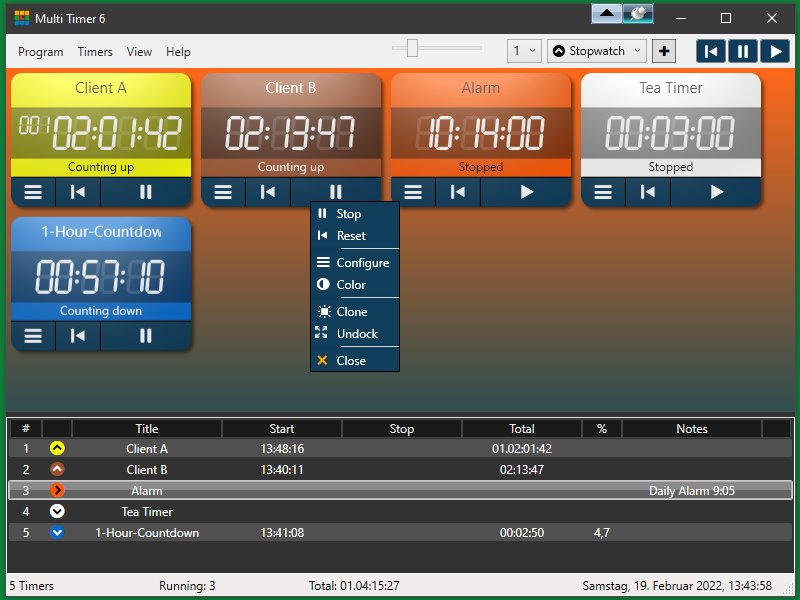
- Resizable main window with timer area on top and list view at the bottom. The timers can be resorted by drag & drop and resized with the trackbar or Ctrl + Mousewheel.
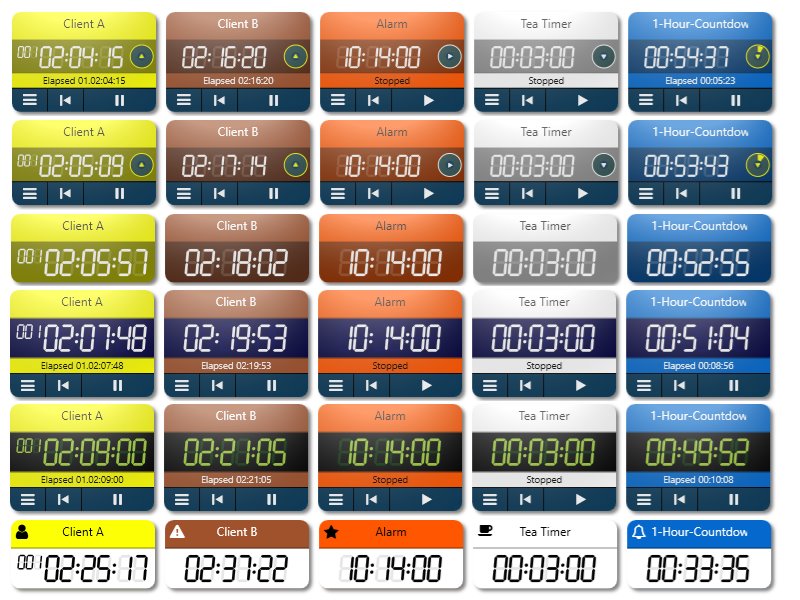
- Many different design options for the timer controls (inside the window or undocked)
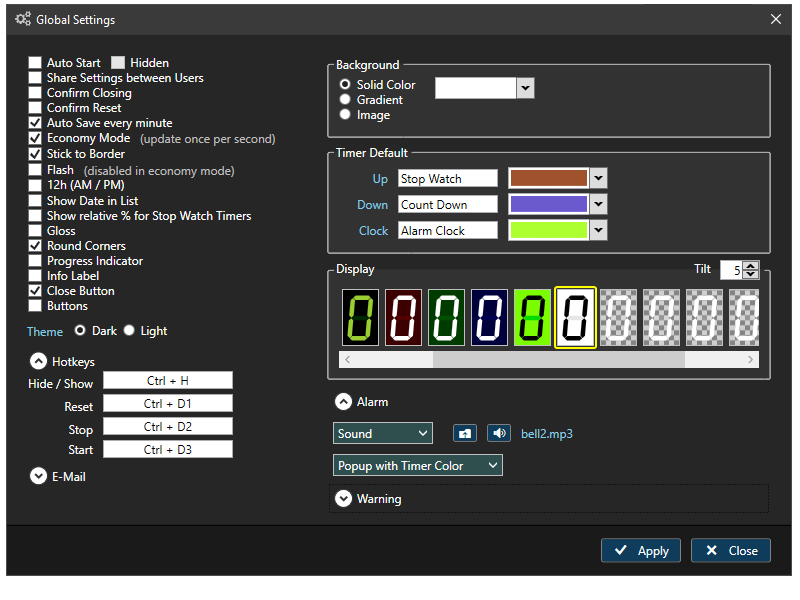
- Global settings dialog
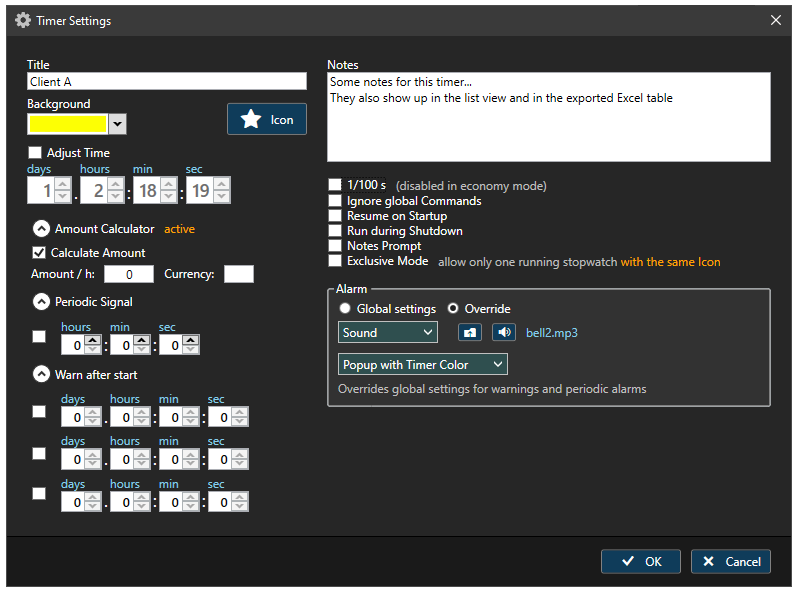
- Timer settings dialog (different for each one of the three available timer types)
You can add as many timers to the window as you like and create copies of existing timers. All timers show up in the list view on the bottom, which can also serve as an operating interface via the context menu, to control the timers. The list shows start time, stop time and total time and can be exported to an Excel file. Timers can be undocked and placed anywhere on the desktop, in any size. Timers can work in three modes: Stopwatch, Countdown and Alarmclock (single event or recurrent). They can pause and continue and they can even keep counting the time while the program is inactive.
Timer controls can work in stopwatch mode (count up to 1,000 days total), count-down mode (down from 1,000 days maximum) or alarm clock mode (daily, on selected weekdays or at a specific date). Timers can be started and stopped in groups or be connected in exclusive mode or chain mode. Background color and an associated icon can be set. Timer controls can be copied (cloned): right-click a timer (or the corresponding menu entry) and select "Clone" and the number of clones (1..9) to create new timers with identical settings. Each timer has a title for identification and a text field for notes. Calculate and show the actual amount for a client bill in the info label, based on an "amount per hour" value.
-
Main Features
- Virtually unlimited number of resizable timers in a flow layout interface or single, free floating
- Different colors and icons for the timers, to keep them apart or create groups and many options to change the design of the timers and the display
- Drag and Drop support - timers can be moved and rearranged within the array by drag & drop
- Control the timers from a connected, sortable list and export it to Excel spread sheet
- The list can be used to control the timers (via context menu) single or in groups
- Timer states are saved and they can be paused and resumed later
- Optional Resume on Startup and Run during Shutdown
- Cloning function: create up to 9 clones (identical copies) of any timer
- Solid / gradient color or background image for the window background
- Timers can be started, stopped and reset single / all timers / a selected group
- Global hotkeys to start / stop / reset timers and to hide / show the program window
- Export / Import function to save and restore or to transfer timer configurations
- Settings file in XML format, easily readable and editable by humans
- Eternal event list of all stopwatch timers, until deleted
- Timers have a title text plus an optional unlimited notes text
- Fly-in banner notification and sound signal on alarm - plays any sound file (mp3, wma or wav) or speak the timer title
- Dark or Light interface color scheme
- E-Mail notifications for each event (Start / Stop / Finished / Reset)
Notice: GMail-accounts as a sender are no longer working for this function since 2022, but a free Outlook account for instance works fine
- Internal accuracy of 1 microsecond, for saved data: 1 millisecond, display accuracy: 1 second or 1/10 seconds
-
Stopwatch
- Count the time up to 1,000 days
- Adjust the start time or change the time any time during runtime
- Exclusive Mode (allow only one running stopwatch of a defined timer group)
- Exportable Event List to save any event, the elapsed time and the current time plus notes
- Lap events (in-between-time events)
- Calculate and display the amount for a passed time, based on an "amount / h" value
- Optional notes prompt (dialog window that pops up on any event, to enter notes
- Optional Periodic Alarm Signal every 5 seconds ... 24 hours
- Up to 3 optional warnings after timer start in selectable intervals
- Optional 1/100 second display
-
Countdown
- Count down from up to 1,000 days
- Chain Mode: connects timers of a group (with the same icon) and starts the next timer as soon as the previous one is finished
- Auto Reset: enables periodic timers or endless loops of one and the same timer or several connected timers
- Up to 3 optional warnings before the count down finishes
- Set the timespan either with days/hours/minutes/seconds (timespan) pickers or optionally from a target date/time
- Adjust Time +/- 1, 5, 10 or 30 minutes during runtime or after the countdown finished from the context menu
- Optional 1/100 second display
-
Alarm Clock
- Alarms can go off daily, at a certain date or weekly (on one or several specified week days)
- 24 hour or 12 hour (AM/PM) time display
- Up to 3 optional warnings before the alarm fires
-
Reviews and Testimonials
I take pride in making and keeping Multi Timer the very best Windows timer program in the world.
 It is being used by thousands of satisfied private and business users (including schools, universities, companies and (even government) organizations worldwide) for years.
I guarantee that the statements below are actual, authentic reviews by registered users of this program, published at CNET / Download.com or sent to me by users.
It is being used by thousands of satisfied private and business users (including schools, universities, companies and (even government) organizations worldwide) for years.
I guarantee that the statements below are actual, authentic reviews by registered users of this program, published at CNET / Download.com or sent to me by users.- »Exactly what I needed! I've used this program now for three scientific experiments (I'm using 76 consecutive timers over 4 hours), and it helps me immensely! I definitely recommend to any researcher instead of perpetual fiddling with timers. Fantastic. Definitely worth the cost.«
- »This software is perfect for OSCE and MMI exams ( ECOS and MEM in french ). Just plug a laptop to a PA system and you're good to go. Been using it since 2010 and it's been a blessing! Full of features, flexible, very stable, great support.«
- »I am a French bakery/pastry/takeout in North Carolina (USA). Multi Timer is part of my baker toolbox, like oven or proofer. Over 19 timers work in parallel to provide me real time data related to fermentation, proofing, baking and cooling, displayed onto an extra screen into my workshop, for all batches of dough. Accurate, totally modular: i was looking for it; I have it now.«
- »A very flexible program, you just keep adding timers to a window to suit your purposes. Each timer can be created to count up, count down or be an alarm. You can lable each one too, so you can lay out a series of tasks and move from one count-up timer to the next, perhaps using one as an alarm. You can enter detailed text to be read when the alarm is up too. The timer interface is very intuitive, you can operate it without reading any instructions, like Apple Mac software. I can't think of what more I would want in timer software, but I was able to write to the author directly with a suggestion.«
- »I like the sheer number of timers you can have running at the same time, and the ability to extensively label each timer, interface is pretty straight forward, and more options than you'll ever need, and the price is good too. It's difficult to think of anything of significance that I don't like, I really needed this timer, I really like it overall and appreciate all it's exhaustive features & options, the most elaborate timer I've ever used.«
- »The program is built on a stable and well-thought-out idea and is working very well. No bugs detected yet.«
- »An accurate multi-timer with start, pause, restart ability, and stop ability. All pertinent information is recorded and can be pasted into Excel at the end of the day. For multi-day projects timers and values are remembered between sessions. There are cheaper timers out there, but this is the only one I've found that does what I need a multi-timer for.«
- »If You Need This...You'll Love This...Very Flexible...Lot's Of Features. I like the sheer number of timers you can have running at the same time, and the ability to extensively label each timer, interface is pretty straight forward, and more options than you'll ever need, and the price is good too.«
- »Perfect for OSCE and MMI exams! Full of features. Flexible. Very stable! Great support. This software is perfect for OSCE and MMI exams ( ECOS and MEM in french ). Just plug a laptop to a PA system and you're good to go. Been using it since 2010 and it's been a blessing!«
- »A great idea, and a great piece of software! Something that I always needed, but couldn't find. Endless counters, the possibility to name them and even to specify their starting time.«
- »This tool is exactly what I needed. Other apps only have 1 timer for each type, but I need many. It's also great that you can download the history of each timer, which is handy to show clients for instance. It helps me save time, hold myself accountable and keep a nice and clean overview of how I invest my time on a monthly basis. Support is great as well; I had some queries and got a reply within hours.«
-
Version History
- 6.91 (September 6, 2024) Replaced all references to the MD5 algorithm with SHA256 and AES, to make the program FIPS compliant (program must be activated again after updating); Updated several third-party DLLs
- 6.9 Small bug fix / improvement: the "Notes Prompt" did not work right on program start, before selecting a list view item; The position of the icon dialog is now saved and restored
- 6.89 Improvement for count-down-timers: the target time(span) can now be selected not only from the timespan pickers, but optionally from date/time pickers with a month calendar
- 6.88 New options for daily alarms: They are reset and restarted now by default after 5 seconds and do not have to be restarted manually after running out. Other options are 1 minute, 5 minutes, 1 hour and manually. The superfluous checkbox "Run during shutdown" has been removed for alarm settings (applies always); Notification banners now have a drop shadow, to make them easier to notice on the desktop; List items in the timer list and the alarm list can now be double-clicked, to open the settings dialog.
- 6.87 New feature: an option to show actual AMOUNTS for stopwatch timers (like for a client bill). Activate the checkbox "Calculate Amount" in the timer settings and enter an "amount per hour" (and optionally a currency symbol). The calculated amount will be shown in the timer info label and in the percentage column of the list view
- 6.86 Fixed: context menu items now respond also when the mouse is in the area between icon and text; Updated some DLLs
- 6.85 Fixed a bug with the sound player; Updated a couple of DLLs
- 6.84 Added a "Browse" button to the Export / Import module; Updated several third-party DLLs
- 6.83 Fixed the "warning" and "periodic alarm" functions, which did not function reliably
- 6.82 Timer settings window would not open on some systems, due to a bug in the month calendar, added in v.6.8 - fixed
- 6.8 Added a month calendar to the timer settings for setting the alarm date, for timers in Alarm Clock mode (replacing the old date picker); Count Down timers are now resetted when in stopped (paused) mode and the timer settings are opened; In Stop Watch timers the "Adjust Time" function now also includes the "seconds" picker, for better consistancy; All opening dialogs disable the "Topmost" state if active, while they are opened (so they are not hidden); Added and modified some mouse-over tooltips in the settings and Import/Export dialogs; Fixed some minor bugs.
- 6.7 Fixed the Excel export function, which was broken in an earlier update; Fixed a bug: after editing a newly created stopwatch timer, the display did not show 00:00; Updated some DLLs
- 6.6 Addes a third tab to the Info dialog: Limit Access. It allows a user to restrict access to certain program functions, in oder to prevent accidental changes.
- 6.5 Changed the font in the time number pickers; Some changes in the setup part (DLLs are no longer embedded into the EXE, but copied to the program folder)
- 6.4 Added an information text to the Export / Import dialog about the available options and their meaning; Updated several program libraries
- 6.32 The alert notification popup now opens on the active screen (the one with the program main window), not anymore on the main screen
- 6.31 Added an option "Save Count-Down Events" to the Export-Import dialog, so that not only stopwatch timer events will be exported to the log file.
- 6.3 Added an option "Economy Mode" to the global settings, which is also the new default. When activated, the interface will only be updated once per second, otherwise 10 times each second. Since the program might be too demanding in terms of CPU and GPU usage when the interface is visible, the economy mode is recommended to save power.
- 6.2 Added a feature "Auto Save on full minute" (default) to the settings, so the timer settings will be properly restored (at least +/- 1 minute) after a power failure, when timers were still running on program exit and the program was not closed regularly. Also settings will now be saved when the settings dialogs are closed.
- 6.1 Fixed the option to share program settings with all users at the same PC, which didn't work before
- 6.03 Minor bug fix in the context menu (unreadable symbols in some submenu items)
- 6.02 Added "View" menu item to the main menu with several new menu items; Undocked timers return to their previous undocked size and position, if redocked temporarily
- 6.01 Bug fixes
- 6.0 (December 5th, 2019) New program version, programmed from scratch. Payed upgrade, no free update this one time. Countless improvements and new features, just install the trial and see for yourself. New features: full WPF programming technique; New design with resizable timers and many styling options like icons (which serve also to connect timers to work in exclusive mode or chain mode. Up to 3 warnings after start or before alarm. Maximal time is now 1000 days; Periodic alarms; Banners on alarm instead of popup windows; Data are saved in XML format now and no longer in binary format; Automatic backup saving (selectable number) and more...
- 5.44 Fixed reliability of tick sound
- 5.42 1/10 seconds show up in the lap list now, if activated
- 5.4 Added an optional ticking sound, when at least one timer is running; Fixed cause of crash on timer docking
- 5.3 Added the option to change the elapsed time in Stop Watch mode, after the timer has been started
- 5.22 Fixed a minor bug: after a new install the default color combo did not look good
- 5.21 Undocked timers will now also hide and show on hotkey press
- 5.2 The size of undocked timers is now synchronized to the currently resized timer windows (can be deactivated by pressing and holding the Ctrl key); Added a new menu item "Align undocked Timers" for aligning undocked timers; Fixed a bug: clicking a list column header caused an exception when there were undocked timers
- 5.1 Added a circular progress (percentage) indicator for timers in count-down mode; Fixed a small bug, which made it difficult to resize undocked timers
- 5.0 The timer display can now feature a LED/LCD style! Additionally some design features have been added or improved: In the old Default Color section (now: Default Style) a Preset picker has been added, with many color presets for the display, including an "Inactive Segments" picker for the "LED Style" option; Also added a "Flash" option in the General secion of the settings, for making the marker flas optional and also the dot delimiters, when in LED mode
- 4.1 The percentage column for stop watch timers now Shows the percentage of the elapsed time in relation to all stop watch timers; Timer presets are now immediatly updated (and exported) in the timer list, not just after the timer is started - also the extended settings dialog shows the preset time correctly, after being reopened; Added an optional confirmation, when "Reset" is clicked
- 4.01 Increased the time span until auto reset for elapsed count-down timers from 2 to 10 seconds, when in chain mode, so longer sound files can be played
- 4.0 Undocked timers can now be resized by dragging the handle in the lower right corner; Bugfix: undocked timers didn't show correct elapsed time after a program restart
- 3.9 Fixed display in Alarm Clock mode, when timers are not started (used to be 00:00); Added "loading" window on startup or import and loading timer controls asynchronously; Program can now be installed on an administrator account and used on a normal user account with the same configuration
- 3.82 Fixed the "run during shutdown" function for count-down timers, which was broken
- 3.81 Made a few tweaks to enhance program stability
- 3.8 New feature: optional start time preset in Stop Watch mode - start with a preset of up to 200 hours
- 3.72 Bug fix: undocked timer could not be closed properly
- 3.71 Bug fix: undocked timer would be added twice to the list view, when docked again
- 3.7 New feature: Timer controls can be undocked from the main window and dragged around on the desktop
- 3.61 Minor bug fix (on startup during trial period the reminder popup could be obscured by the alarm popup)
- 3.6 Important improvements and bug fixes: Timer List and Event List are now exported to native binary Excel format (97-2003, *.xls), alternatively *.xlsx (2007/2010) instead of XML; The sum of the total elapsed time in the exported file is now only calculated from timers in Alarm Clock (Count Up) mode; Fixed the cause of a crash, related to sound set to "repeat" mode; Fixed some bugs related to alarms / alarm sound: volume in extended settings is now correctly initialized with global value, repeat mode is handled correctly and the alarm sound is stopped in any case when timer is stopped
- 3.5 New features: "Chain Mode": start the next (count down) timer, when the previous one has finished. When the last timer finishes, the first one starts again.; E-Mail events: send mail notifications to a remote user for each event (Start / Stop / Finished / Reset)
Guaranteed: no adware no spyware no viruses no toolbars or bloatware no hidden fees
Runs on Windows 7/8/10/11 (x32 or x64)
 Version 6.91